
FotoWeb allows you to build custom check-out applications or integrate FotoWeb with other web shops through the GetShoppingCart command request.
Figure 1: UML diagram of an integration with FotoWeb's shopping cart
In a typical application, users would add files to FotoWeb's shopping cart. When they are satisfied with their selection and click Checkout, the user is transferred to a third-party checkout application. The check-out application can run on the same server as FotoWeb, or in a different location.
The checkout application contacts FotoWeb and retrieves the content of the shopping cart as an XML document. It then guides the user through whatever steps is necessary.
'GetShoppingCart.fwx' returns the specified user's complete shopping cart information in XML format. This XML document contains complete user information and list of files in the shopping cart. Each file list entry contains detailed information about the file such as path, size, image information (for image files), IPTC data and a set of tokens that give access to thumbnails, previews and to download the files.
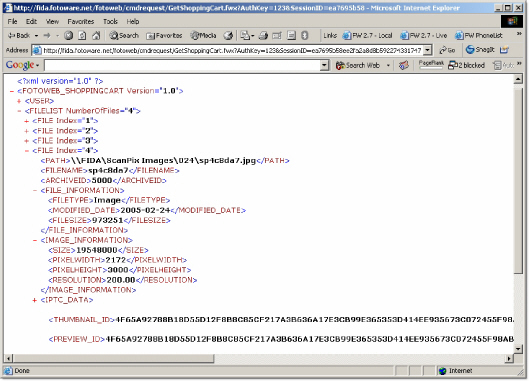
Figure 2: XML document delivered from GetShoppingCart.fwx
The GetShoppingCart command request is called as if requesting any other Fwx page with its parameters passed in with query string:
http://servername.domain.com/fotoweb/cmdrequest/GetShoppingCart.fwx?AuthKey=< Integration Authentication Key>&SessionID=<User's session id>& Preview1Size=400&Preview2Size=900&Preview3Size=1800&Preview4Size=3500
As illustrated in the sample access URL, this command request takes in several parameters. The two first parameters 'AuthKey' and 'SessionID' are required, while the remaining 'PreviewXSize' parameters are optional.
This is a required parameter that refers to the integration authentication key defined in the site settings. This key serves two purposes. It is used to check if the 'GetShoppingCart' functionality is enabled on the site and to check validity of requests made to this command request.
To set this key, right click site's context menu in FotoWeb Administration Console and navigate to Properties | Advanced | Integration Authentication Key. This key is not provided through any tag/variable in FotoWeb and must be known by the calling page/application.
This is a required parameter that refers to the session id of the user whose shopping cart is being retrieved. The session referred by this id must exist and must not be timed out.
The session id of the currently logged on user is provided through the global 'CurrentUser' tag's variable 'currentUser.SessionId'. This variable can be accessed from anywhere in the FotoWeb templates without creating the 'CurrentUser' tag context.
The 'PreviewXSize' parameters are optional. These parameters are used to create preview ids that can be passed to 'preview.fwx' to get previews of different sizes.
Preview1Size
This parameter is used to create 'PREVIEW_ID'. If this parameter is not specified, then the site's preview size is used for the preview generated by this id.
Preview2Size
This parameter is used to create 'PREVIEW2_ID'. If this parameter is not specified, then the preview generated by this id has a max dimension of 900 pixels.
Preview3Size
This parameter is used to create 'PREVIEW3_ID'. If this parameter is not specified, then the preview generated by this id has a max dimension of 1800 pixels.
Preview4Size
This parameter is used to create 'PREVIEW4_ID'. If this parameter is not specified, then the preview generated by this id has a max dimension of 3500 pixels.